
EnotRemote

Remote access for macOS and Windows

Work on another computer as if it were your own

Open your work computer from home or help your parents with their settings. The picture never breaks into blocks when the connection stumbles, and shortcuts and keyboard layouts work just like on your own computer.

EnotRemote runs on macOS and Windows computers. Send yourself the link to download it on a computer.

Install the app on both computers: the one you connect from and the one you connect to.

  • Free while in beta
  • Русский, English, 中文
  • Servers in Russia
The EnotRemote raccoon next to a monitor with the app open

How it works

Three steps to another computer

  1. Install on both computers

    And sign in on each: email, password and a code from an authenticator app. Both can use one account, or each their own.

  2. Enter the address

    Every computer has its own nine-digit address. Your own computers are easier to pick from the address book: it is the same on all your devices.

  3. Accept the connection

    The other computer shows a window with the email of the person connecting and a verification code. Same code on both screens? Press “Accept”.

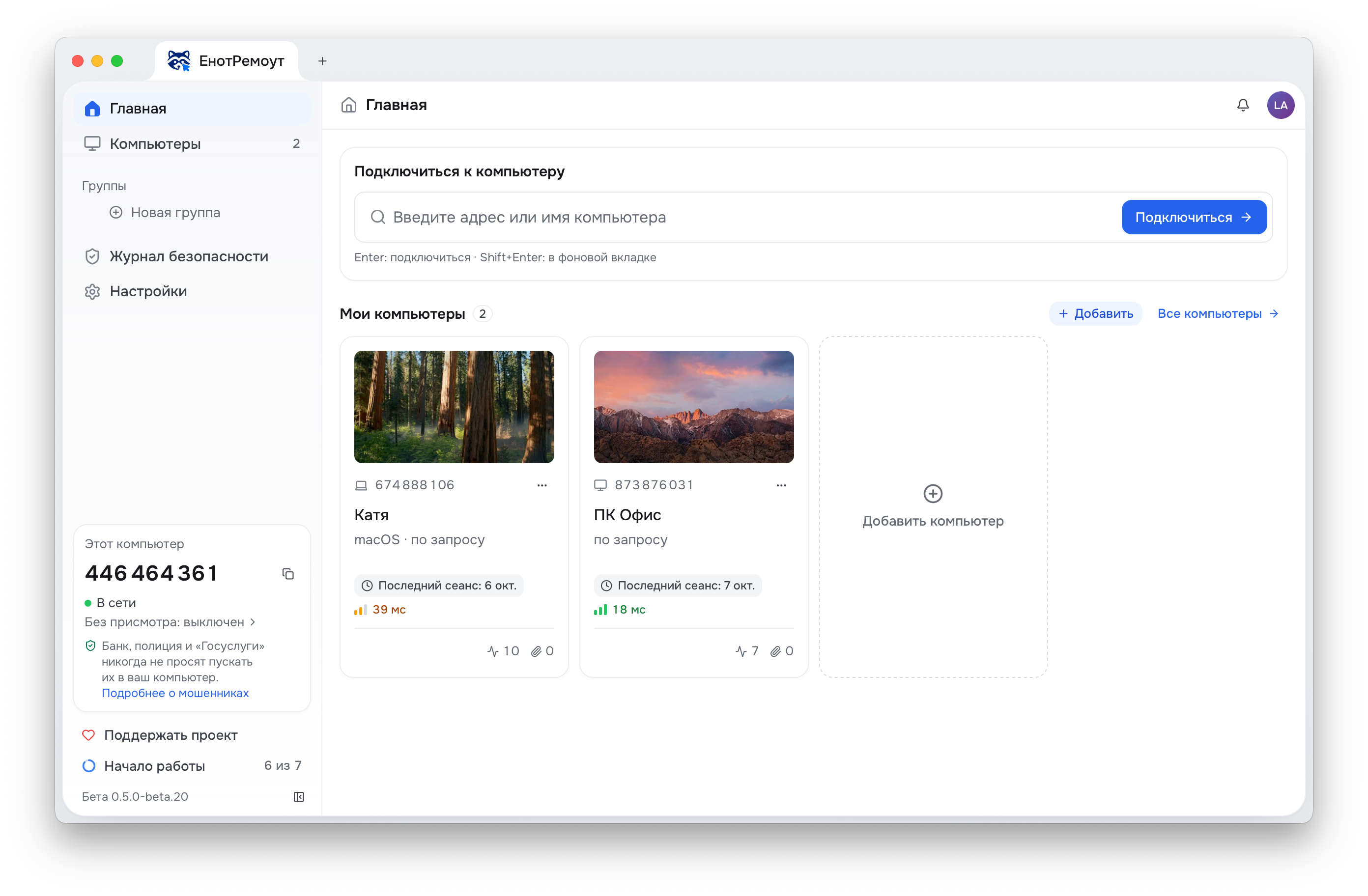
The EnotRemote main window: the address field, computer cards and this computer’s address in the sidebar
The main window: this computer’s address on the left, your computers and the address field on the right.

Features

Everything you are used to works on the other side

  • Mac and Windows understand each other

    Cmd on a Mac becomes Ctrl on Windows and back, so copy, paste and undo work out of habit whichever way you connect.

  • Your keyboard layout comes along

    Switch the input language on your computer and it switches on the other one. No guessing which language the other side is typing in.

  • When nobody is around

    Set a permanent password on a computer and connect to it without anyone pressing “Accept”. Your own computers on the same account let you in without a password.

  • Sound, clipboard, monitors

    You hear the other computer’s sound, text copies both ways, and you can pick any of its monitors. The graphics card encodes the picture.

The Myelin protocol · built in-house

A network hiccup does not turn into a freeze

Remote access is usually praised for its average speed. But it is the worst moments you remember: the cursor half a second behind, the picture breaking into blocks, a frozen screen. We built our own protocol, Myelin, to remove exactly those. It resends lost data without holding up the rest, and never builds the picture on a frame that did not arrive, so there are no blocks.

Worst picture delays when the connection stumbles A 40 ms network loses 3% of packets in bursts. The 99th percentile is shown: only one update in a hundred takes longer.
Myelin
59 ms
The same engine over TCP
1012 ms

Measured on the engine’s test bench with an emulated network. A probe on the viewer’s computer clicks the mouse and reads the screen, so the numbers include everything a person sees. Many remote access programs send the picture over TCP.

Security

Only the person you see and let in gets in

The computer being connected to decides. Our server can refuse a connection, but it cannot allow one on your behalf.

  • No anonymous users

    You can only connect from an account with a confirmed email and a second factor: a code from an authenticator app.

  • You see who is connecting

    The “Accept” window shows the email vouched for by the service, the account’s age and a six-digit verification code. Same code on both screens means nobody is in between.

  • Warns about scammers

    Banks, the police and the tax office do not connect to computers. The “Accept” window reminds you of that with every request.

  • A session is always in sight

    While someone is connected, a pill on the screen shows their email and an “End” button. A forgotten session ends by itself after an hour without input.

  • Passwords stay off the network

    The computer’s password is not sent even encrypted, our server never learns your account password, and the address book is encrypted on your devices.

How to stay safe from scammers →
This is the “Accept” window on the computer being connected to

Connection request

Declines in 0:47

674 888 106 · MacBook Air

Account is 3 years old

Someone is calling and asking you to press “Accept”? Hang up: that is how scammers work.

Verification code

482 917

The person connecting sees the same code

Questions and answers

How much does it cost?

While in beta, EnotRemote is free with no time limits. The project lives on voluntary donations. Paid plans will come after the beta, and a free option will stay.

Do I need the app on both computers?

Yes, on both. Mac and Windows work in any combination: Mac to Windows, Windows to Mac, between two Macs or two Windows computers.

Can I connect when nobody is at the computer?

Yes. On that computer open “This computer”, then “Unattended”, and set a permanent password. Your own computers on the same account let you in without a password.

Who can connect to my computer?

Only a person with an account whom you let in with “Accept”, or someone who knows the permanent password if you set one. During a session a pill stays on the screen, and one button ends it.

Someone is calling and asking me to install a program or press “Accept”

Hang up: that is how scammers work. Banks, the police and the tax office do not connect to computers. If you already let them in, press “End” on the session pill and call your bank on the number on the back of your card.

What if I forget to close a session?

If nobody touches the mouse or keyboard for an hour, the session ends by itself. A minute before that, both sides see a warning and can continue.

Where is my data stored?

Accounts, the address service and the relays run in Russia. A session is encrypted from computer to computer: the relay passes data along but sees neither the picture nor the keys. The address book is encrypted with a key that exists only on your devices.

Can EnotRemote replace AnyDesk or TeamViewer?

For the usual jobs, yes: reach your work computer from home, help your family, get to your own computer when nobody is there. EnotRemote runs on macOS and Windows, its servers are in Russia, and while in beta everything is free.

Can I transfer files?

Not yet. Text copies through the clipboard both ways; file transfer is planned.

Can I connect from a phone or from Linux?

Not yet: EnotRemote runs on macOS and Windows.

Try EnotRemote

While in beta, every feature is free.

EnotRemote runs on macOS and Windows computers. Send yourself the link to download it on a computer.

Install the app on both computers: the one you connect from and the one you connect to.

The app downloads new versions by itself and installs them on restart.